
Office Chairs
How to Choose an Office Chair for a Tall Person
Being tall does not automatically mean you need the biggest office chair. This guide shows you how to compare seat height, seat depth, backrest position, lumbar support, armrests, and desk height so you can tell whether a chair will actually fit your body and the way you work.
By Ronald Dadivas · Published 15 September 2026 · Updated 2 October 2026

If you're tall, finding an office chair is not simply a matter of looking for one with a higher backrest.
A chair can look large enough in a product photo and still feel too small when you sit in it. The seat may end too far behind your knees. The lumbar support may sit in the wrong place. The armrests may not give your arms enough room. Or the chair may fit your legs but leave you sitting too high for your desk.
That's why labels such as tall, XL, and big and tall are not enough to tell you whether a chair will fit.
Your leg length, thigh length, torso, shoulder width, and desk height all affect the result. Real-world testing with tall users has also shown how much these details can change from one chair to another. In one documented test, eight people between 6'3" and 6'8" evaluated more than 50 chairs and compared details such as seat depth, width, armrests, back support, and overall fit.
The better approach is to compare your body with the chair's actual adjustment range.
Measure the Parts of Your Body That Affect Chair Fit
Your height is a useful starting point, but it doesn't tell you which part of the chair needs to be larger.
Two people who are both 6'5" can have very different proportions. One may have longer legs. Another may have a longer torso. One may need more seat depth, while another may need more backrest height.
Before you shop, take a few basic measurements:
| What to measure | What it helps you evaluate |
|---|---|
| Lower-leg length | Seat-height range |
| Thigh length | Seat depth |
| Shoulder width | Seat and backrest width |
| Seated height | Backrest and headrest position |
| Desk height | Chair-to-desk compatibility |
You aren't trying to calculate a perfect chair size from these measurements.
You're giving yourself something to compare against the specifications.
For example, if you know you have particularly long thighs, you can pay closer attention to seat depth instead of assuming that a chair described as "large" will provide enough support.
The same applies to seat height. Knowing how your legs compare with the chair's adjustment range is more useful than shopping by the chair's overall size.
Determine the Right Seat Height
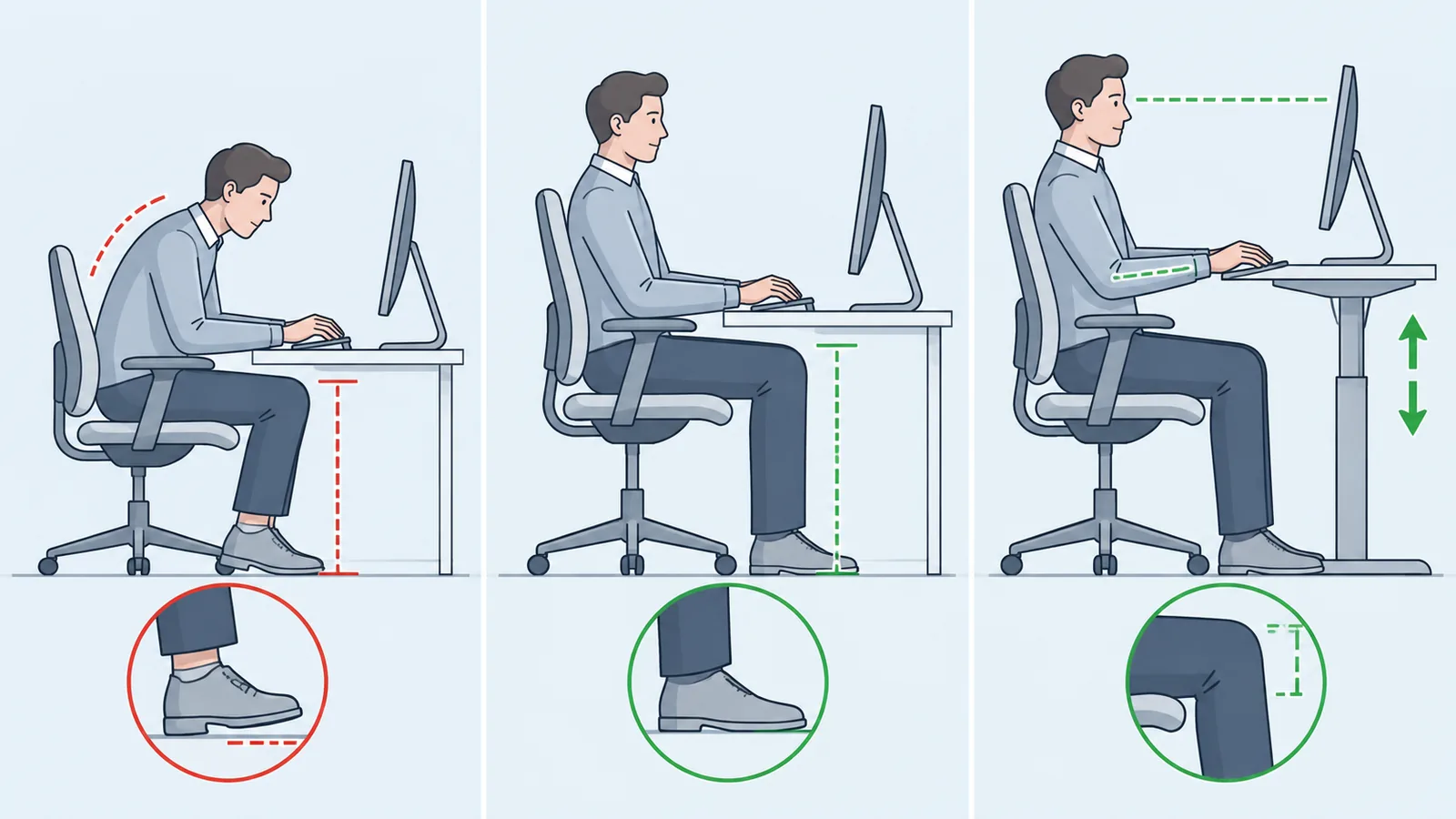
Tall users often need more seat-height adjustment than a standard office chair provides.
But don't make the mistake of simply searching for the highest chair.
The useful question is:
Can I raise the seat enough for my legs while keeping the rest of my workstation usable?
When you sit, your feet should remain supported. Your thighs should have useful contact with the seat without the front edge pressing into the backs of your knees.
Then consider the desk.
Raising the chair changes the height of your hands relative to the keyboard. With a fixed-height desk, a chair that works well for your legs can still leave the work surface too low.
That creates a common tall-user problem:
The chair fits your legs, but the desk no longer fits your arms.
A height-adjustable desk can make this easier because you can raise the work surface instead of forcing the chair into an awkward position.
So when checking seat height, don't look at the chair in isolation.
Think about the complete sitting position.
Use Your Thigh Length to Judge Seat Depth
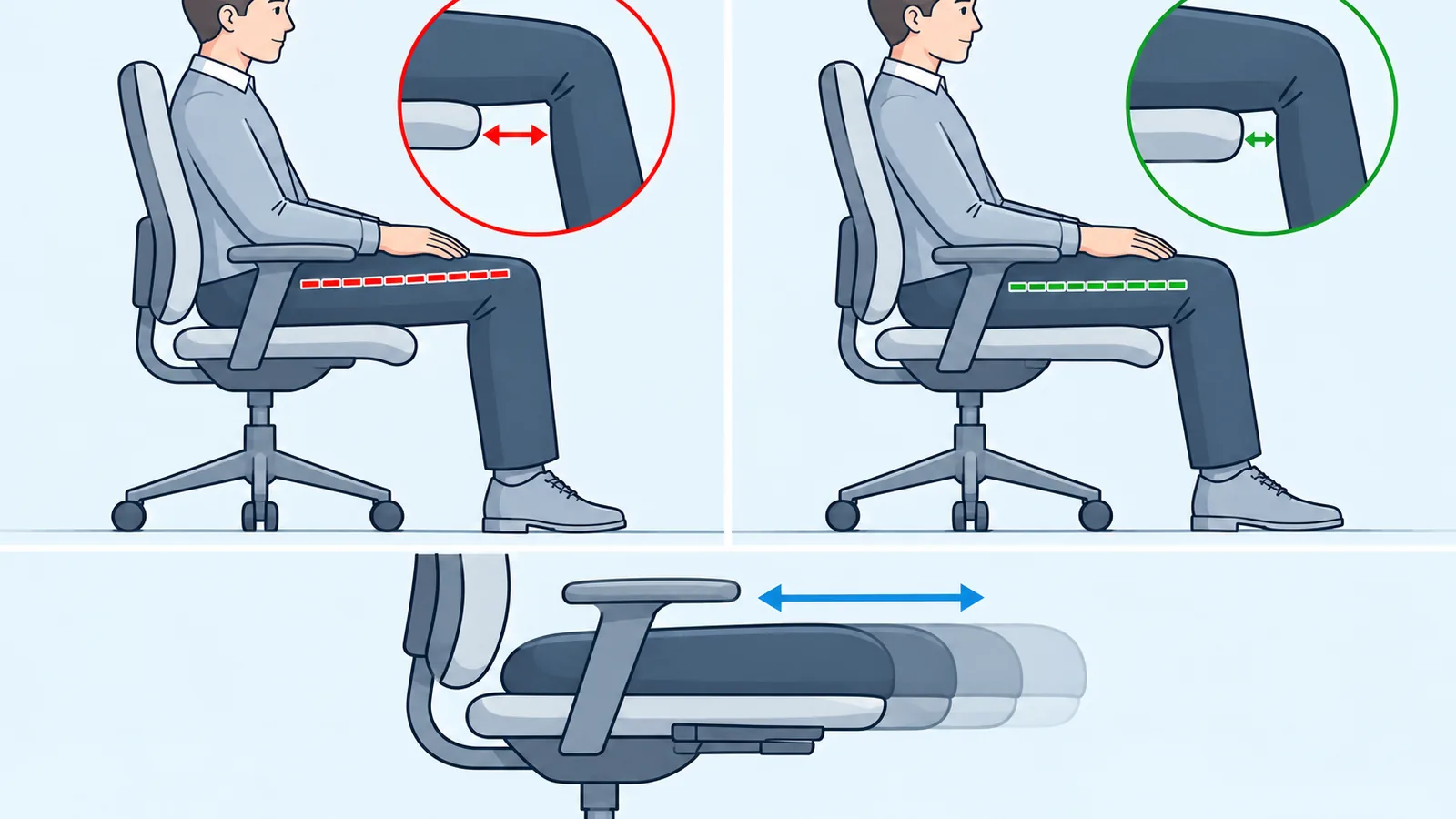
This is one of the easiest specifications to overlook and one of the most important for a taller user.
Seat depth is the distance from the front of the seat to the backrest.
If your thighs are long, a short seat may leave too much of your legs unsupported. You may end up sitting toward the front of the chair instead of using the backrest properly.
But making the seat deeper doesn't automatically solve the problem.
If the seat is too deep, the front edge can press against the area behind your knees. You may then move forward to escape the pressure, which puts you farther away from the backrest.
The useful position is somewhere between those two problems.
Sit all the way back and check the space between the front edge of the seat and the backs of your knees. You want your thighs supported without the edge pressing into that area.
Adjustable depth is especially useful
A sliding seat pan gives you more room to find that position.
This can be particularly valuable if your proportions are outside the range that a fixed seat was designed around.
A chair with a very deep fixed seat isn't automatically better for a tall person. What matters is whether the depth can be positioned so your thighs are supported while your back remains against the backrest.
Don't Treat Seat Width and Seat Depth as the Same Thing
A chair can be deep enough and still feel cramped.
Seat width determines how much room you have to sit naturally and change position. It also affects the space between your body and the armrests.
But being tall doesn't automatically mean you need a wide chair.
A tall, narrow-framed person may need more seat height and depth without needing an especially wide seat.
Someone with a broader frame may need additional width as well.
Look at:
- Usable seat width
- Space between the armrests
- Seat shape
- How easily you can change position
- Whether the armrests restrict your movement
This is also where tall and big and tall start to mean different things.
Don't pay for extra width if width isn't actually one of your fit problems.
Evaluate Where the Backrest Supports Your Body
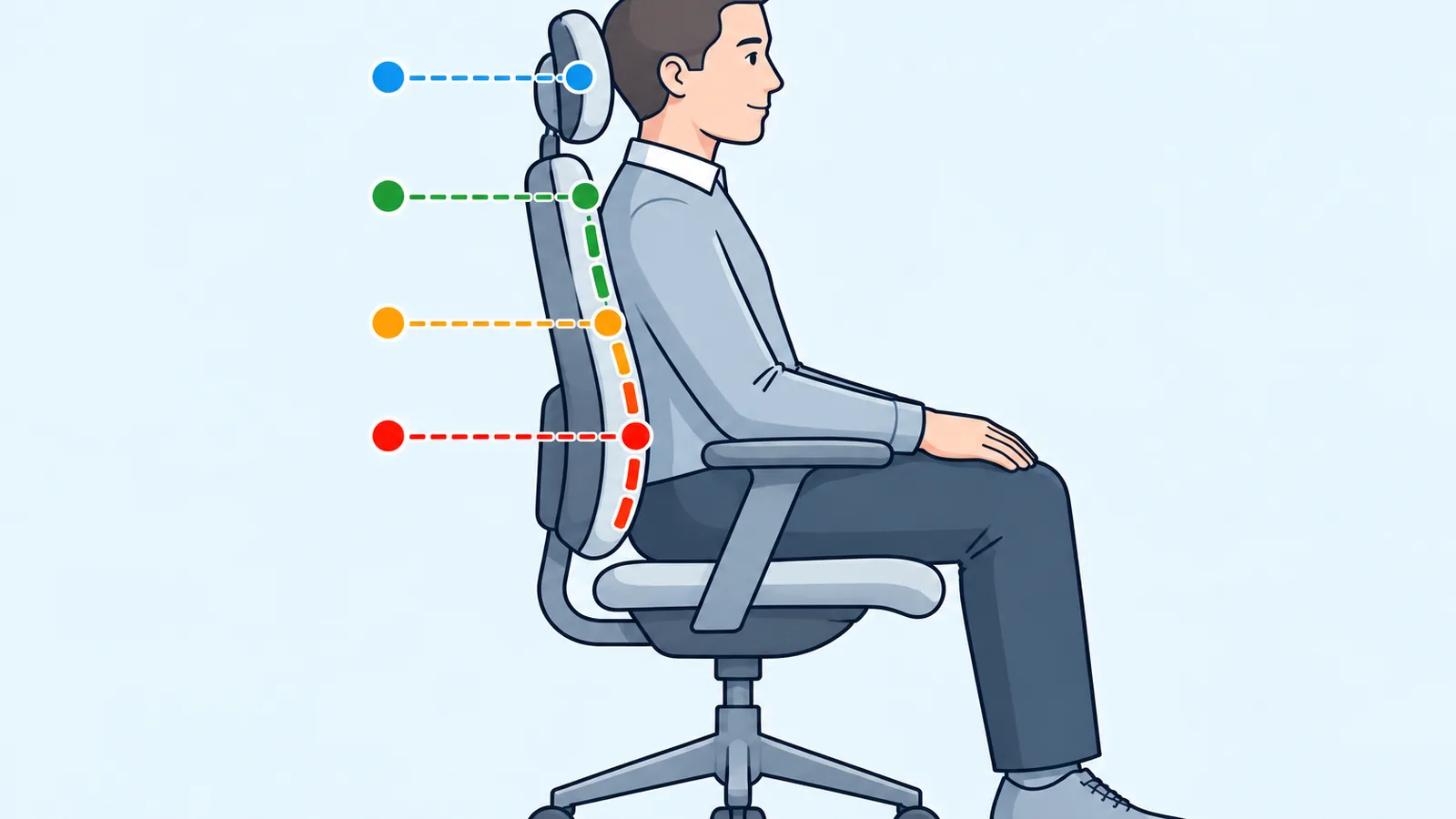
A taller backrest can seem like an obvious requirement for a tall person. But the overall height of the chair does not tell you where the backrest, lumbar support, or headrest will actually sit relative to your body.
Think about the backrest as several areas of support:
Lower back → upper back → shoulders → head
What matters is whether those areas line up with your body when you are seated in your normal working position.
A chair can have a tall backrest while its lumbar support sits too low for you. Another chair may have a shorter-looking backrest but place its support points in more useful positions.
When comparing chairs, look for adjustments such as:
- Backrest height
- Lumbar support position
- Recline angle
- Recline tension
- Headrest height and angle, if included
Instead of asking only:
"How tall is the backrest?"
Ask:
"Where will the chair's support points sit on my body?"
That question gives you a more useful way to evaluate a chair than the backrest's overall height alone.
Put the Lumbar Support Where Your Lower Back Is
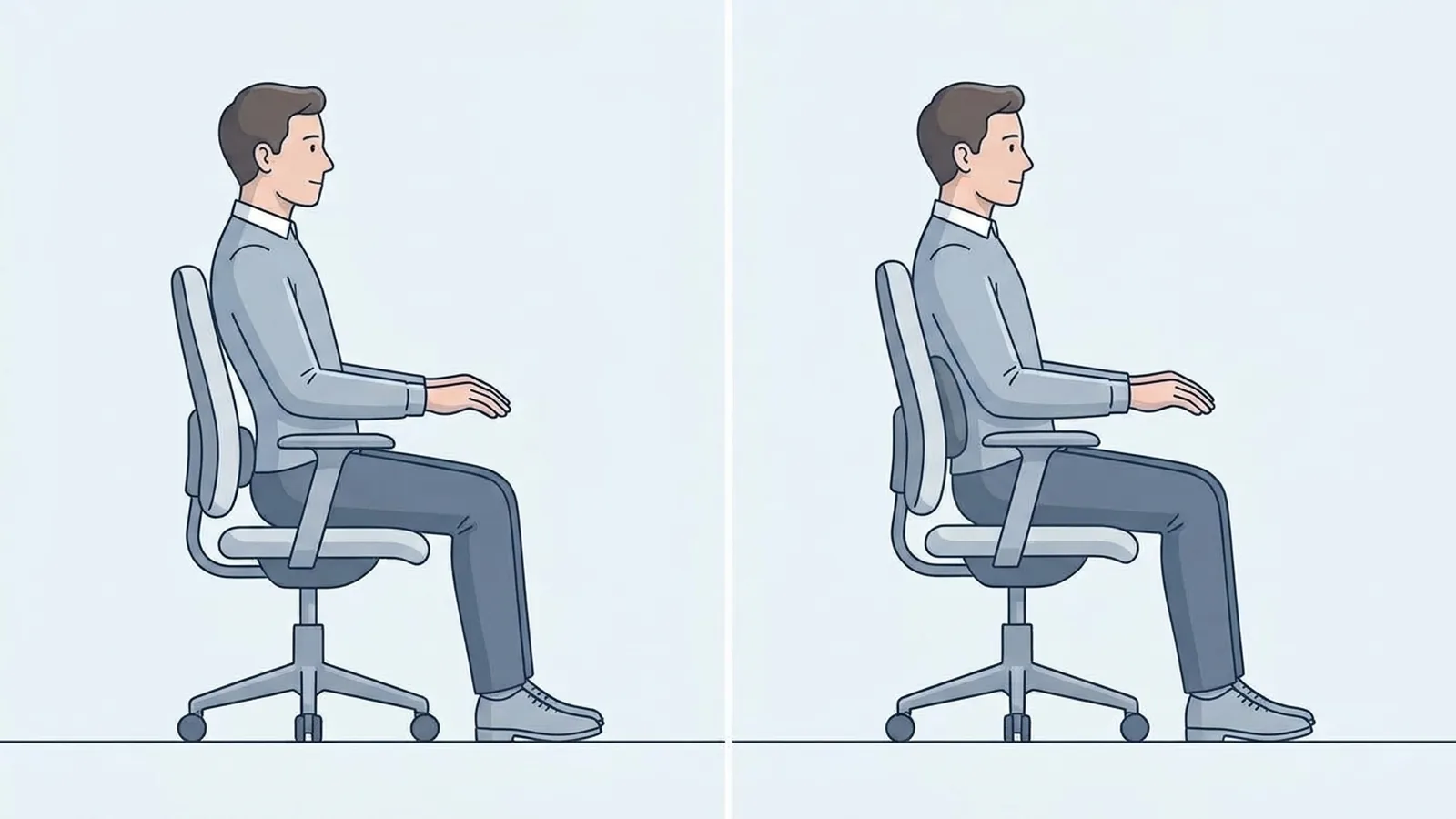
A product page can tell you that a chair has adjustable lumbar support.
That doesn't mean the support will automatically feel right.
The important part is where that support sits when you're actually in the chair.
Sit all the way back and check whether the lumbar area meets your lower back without pushing you into an unnatural position.
If the support can move vertically or otherwise be repositioned, you have more room to adapt it to your proportions.
This can matter for taller users because their torso length may place their lower back differently from the body proportions the chair was designed around.
You don't need the most complicated lumbar mechanism.
You need support that can be positioned where it makes sense for your body.
Make Sure the Armrests Leave You Room to Work
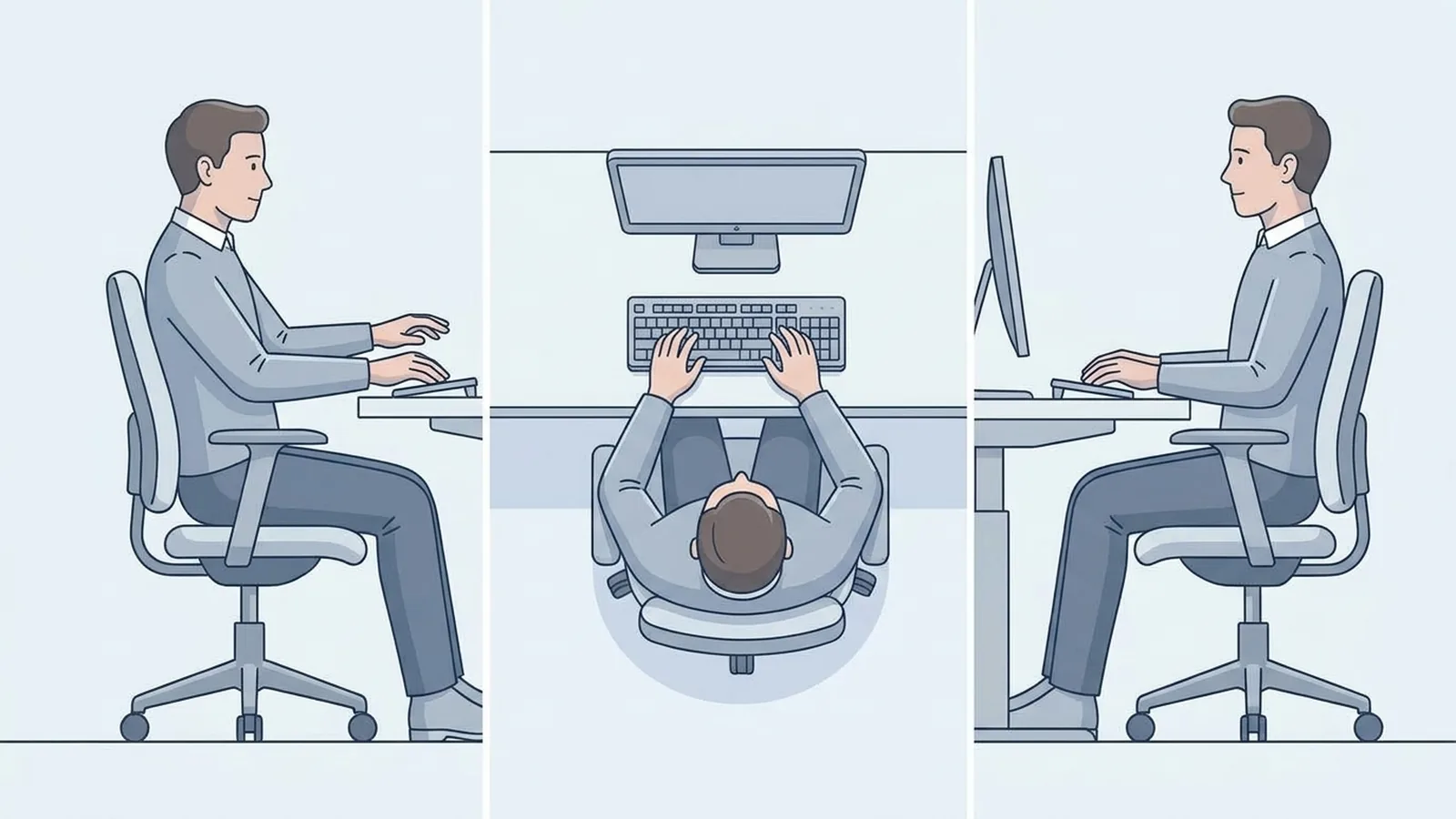
Armrests can become a problem after you raise the chair.
Your seat may finally be at a comfortable height, but the armrests might sit too far apart, too low, or too high. They can also prevent the chair from getting close enough to the desk.
Depending on the chair, useful adjustments can include:
- Up and down
- Inward and outward
- Forward and backward
- Pivoting or angle adjustment
But don't shop simply because a product says 4D armrests.
The real question is whether the armrests can support your arms without interfering with your desk or restricting your movement.
For example, moving an armrest inward may help if its standard position is too wide. Moving it backward may allow the chair to get closer to the desk.
Feature count matters less than useful movement.
Check What Happens When You Lean Back
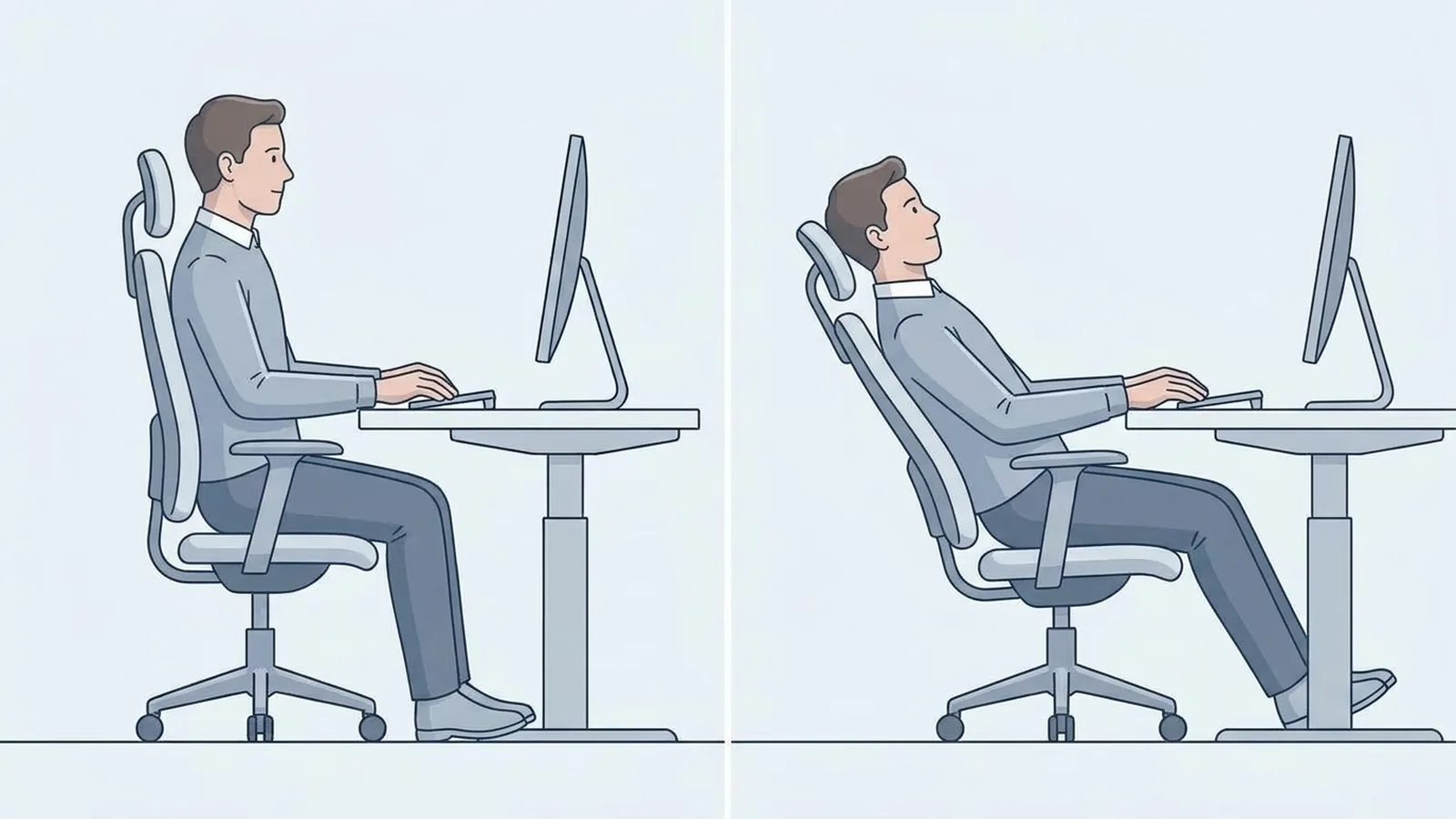
You don't work in exactly the same position all day.
You type. You read. You lean back during meetings. You talk to someone beside you. You change your leg position.
The chair can feel different as your position changes.
A backrest that feels well positioned while you're upright may feel different when you recline. A headrest that seems unnecessary while typing may become useful when you lean back.
This is particularly worth checking for tall users because the relationship between your torso, backrest, and head support can change as the chair reclines.
Try more than one position before deciding whether the chair fits.
The goal isn't to find one perfect sitting posture and stay there all day.
It's to find a chair that continues to support you as you naturally change position.
A Taller Chair Is Not Automatically a Better-Fitting Chair
This is where chair shopping gets misleading.
A chair can have:
- A high backrest
- A deep seat
- A large frame
- A high weight capacity
- An XL label
- A "tall" description
and still be wrong for you.
Why?
Because those specifications describe the size or capacity of the chair, not necessarily where its adjustment points will meet your body.
Imagine a chair with a very deep fixed seat. Your thighs may have plenty of support, but the front edge could still press against the backs of your knees.
Or imagine a chair with a very tall backrest but fixed lumbar support that sits too low.
The chair is large.
The fit is still wrong.
That's why usable adjustment range can matter more than simply making every dimension larger.
Bring Your Desk Into the Decision
A chair should never be evaluated completely separately from the desk.
This becomes particularly important when you're tall because you may need to raise the seat farther than someone shorter.
Imagine the sequence:
You raise the chair.
Your legs feel good.
Your feet are supported.
The seat depth works.
Your backrest feels comfortable.
Then you reach for the keyboard.
Your desk is too low.
Now your arms have become the problem.
Before buying, think through the whole workstation:
Chair height → desk height → keyboard → armrests → monitor
If your chair needs to sit unusually high, ask whether your desk can accommodate that position.
A height-adjustable desk gives you more flexibility because the work surface can move with you.
A fixed-height desk gives you less room to compensate.
This is why the right chair isn't only about the chair.
It's about whether the chair and desk can work together.
When a Big-and-Tall Chair Actually Makes Sense
"Tall" and "big and tall" shouldn't automatically be treated as the same requirement.
A tall user may primarily need:
- More seat height
- More seat depth
- A higher backrest
- Different lumbar positioning
- More armrest adjustment
A larger-framed user may additionally need:
- More seat width
- More space between the armrests
- Higher weight capacity
- A larger usable seat area
- A stronger frame and base
You can be tall without needing a wide chair.
You can also need a wider, stronger chair without being especially tall.
So choose based on the dimensions you actually need rather than automatically moving to the largest chair category.
Test the Chair Like You Would Use It
If you can try the chair before buying, don't sit down for 30 seconds and decide that it feels comfortable.
Use it like a workstation.
Sit all the way back
Can you reach the backrest without sliding forward?
Set the seat height
Can your feet remain supported while the chair and desk are at a workable height?
Check the seat depth
Are your thighs supported without the front edge pressing behind your knees?
Set the armrests
Can your arms rest naturally without your shoulders being pushed upward?
Move toward the desk
Can the chair get close enough to the keyboard?
Recline
Does the backrest continue to support you?
Change position
Can you shift naturally without the seat, armrests, or backrest becoming restrictive?
This is a much better test than asking whether the chair feels comfortable during your first few seconds in it.
Tall-Person Office Chair Checklist
Before buying, check these specifications:
| What to check | What you're trying to find out |
|---|---|
| Seat-height range | Can the chair reach a useful height for your legs and desk? |
| Seat depth | Is there enough thigh support without pressure behind your knees? |
| Seat width | Do you have enough room to sit and move naturally? |
| Backrest height | Does the backrest reach the areas that need support? |
| Lumbar adjustment | Can the lower-back support be positioned correctly? |
| Armrest adjustment | Can your arms be supported without blocking the desk? |
| Recline | Does the chair remain supportive when you lean back? |
| Headrest adjustment | If you use one, can it actually reach your head and neck? |
| Weight capacity | Does the stated capacity match your requirements? |
| Desk compatibility | Can the chair and work surface create a workable position? |
| Seat-depth adjustment | Can you fine-tune the seat instead of relying on one fixed position? |
| Return policy | Can you send it back if the fit isn't right? |
You don't need the chair with the most adjustments.
You need the adjustments that solve your fit problems.
Final Takeaway
For a tall user, the most important number on an office-chair specification sheet may not be the one that first catches your attention.
A chair can have a high back, a deep seat, and a large frame and still leave you sitting too far forward, with unsupported thighs or lumbar support in the wrong position.
The better test is whether the chair's adjustment points line up with your body.
Before buying, compare your own measurements with the chair's seat-height and seat-depth ranges. Then look at where the lumbar support, armrests, and backrest will sit when you're actually seated. Finally, check what happens when you place that chair at your desk.
For a tall person, I would pay particular attention to these four questions:
- Can the seat reach the height I need without creating a problem with my desk?
- Is the seat deep enough to support my thighs without pressing behind my knees?
- Do the backrest and lumbar support reach the right areas of my body?
- Can I position the armrests and recline without feeling restricted?
If the answer to those questions is yes, the chair has a much stronger case for fitting you, regardless of whether the product is labeled tall, XL, or big and tall.
The goal isn't to find the largest chair. It's to find the chair whose dimensions can be adjusted around your body.